What is UX Design?
The term UX design was created by Don Norman, vice president of Apple in the 1990s, and quite simply means user experience (Miller S., 2021). UX design looks at the type of people who are likely to use the product and designs accordingly, ensuring accessibility needs are met. Designers are expected to consider their user throughout the entire design process to ensure that all of the work is user-centred (Interaction Design Foundation, n.d.).
What is UI Design?
UI design, meaning user interface, focuses on the actual interface, often considering what looks or style are best suited for the target audience (Interaction Design Foundation, 2016). The aim when focusing on UI design is to make the interface easy to use for the intended user.
Designing for Inclusivity
Designing for inclusivity entails making informed design decisions to benefit everyone, including those with disabilities.
A common misconception when designing for inclusivity is that it will only benefit those with the disability you are adhering to; this is often not the case and by designing for inclusivity it can often benefit the majority (Buller J. et al., 2019). For example, if subtitles are added to a video it will benefit those who are hard of hearing, but it could also benefit those who have a temporary ear infection or who are in a noisy public place (Chapman C., n.d.).
The UK government has provided a simple document detailing changes that can be made to assist with different conditions (Pun K.,2016):
Designing for ADHD
Inability to concentrate is a major component of ADHD (National Health Service, 2021). By making small changes to colour, typography and composition, design can be made more inclusive to those suffering with the condition.
Colour: It is recommended that a limited amount of colours is used and that the colour be used to group information, to allow easier navigation. It is recommended to use a neutral background and make content a contrasting colour, that is not too saturated to avoid overstimulation and distraction (Patel S., 2023).
Typography: It is recommended that sans serif fonts are used because they are clear and easier to read compared to other fonts.
A fairly new method that could be used is bionic reading. Bionic reading is a method of reading information that highlights the most concise part of the word in bold. This allows the brain to pick up the previously learned word more quickly, which could help significantly with those with ADHD and/or concentration issues (Bionic reading, 2021).
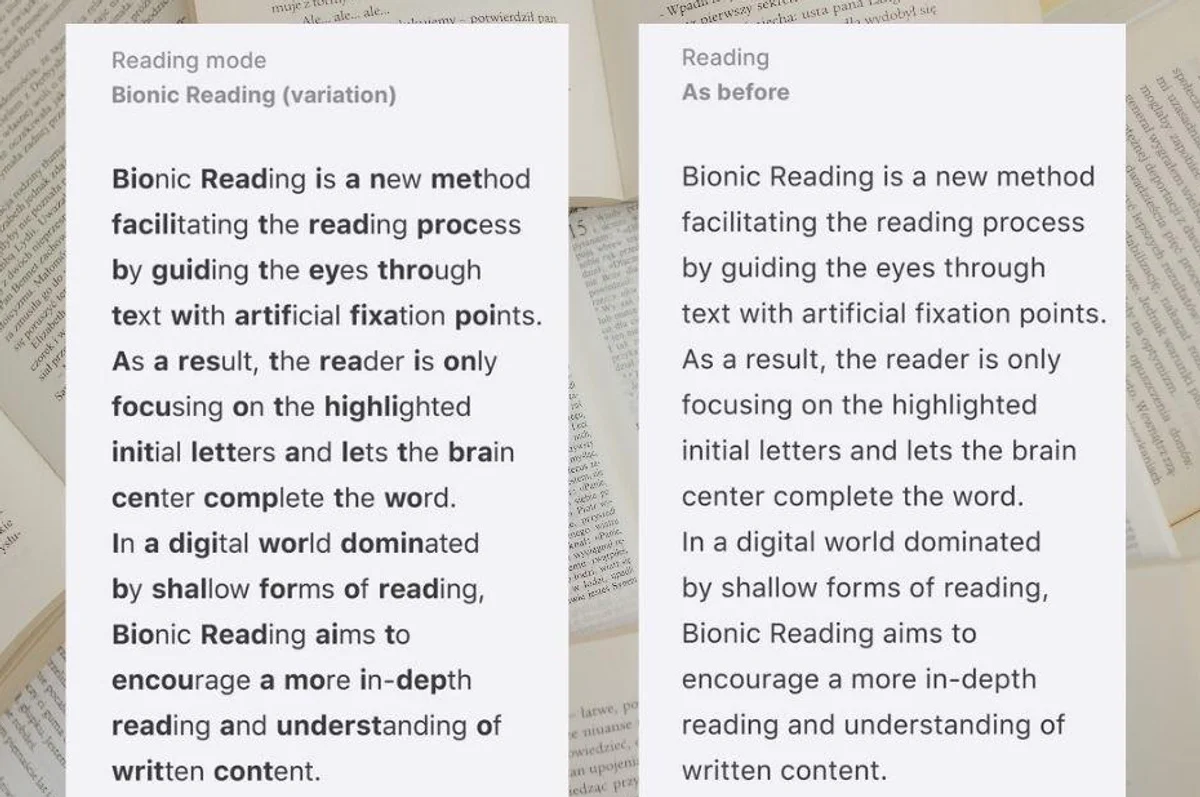
To ensure that the design is accessible for those with ADHD, the design should avoid large bulks of text.
Other:
- Layout should be kept clear and simple
- Give any information in small amounts and summarise in simple terms at the end to ensure it’s easy to remember.
- Do not use too many moving elements on the website – this can be distracting.
(Patel S., 2023)
Personas
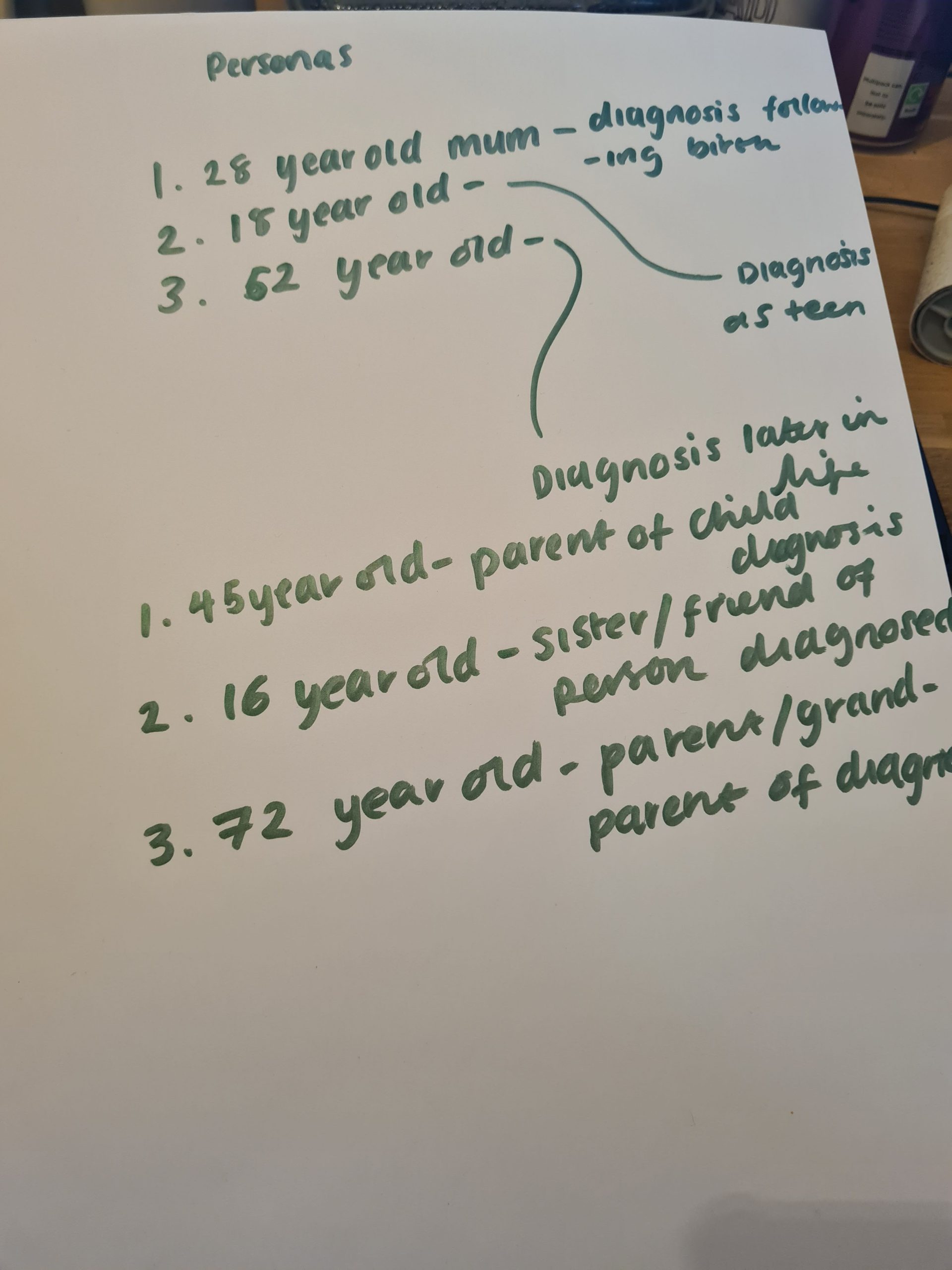
To gain better insight into how I can create an effective user experience and interface, I created three personas based on who might use the website for those with ADHD. The following is a video created through OBS showing these personas.
.
As part of my research following my proposal, I will create further personas for the website for family and friends.
There is an argument as to whether personas actually hinder an effective user experience/interface, in that they are often based on assumptions rather than facts or statistics (Schroeter, 2020). To combat this I will ensure that the wants and needs I convey in my personas, incorporate facts and statistics as well as feedback found in research surrounding ADHD.
Summary
In my project I will continue to research methods of designing for inclusivity and I will also incorporate the material taught in the Web design and UX & UI module to ensure my website is accessible to as many people/groups as possible. By looking at research into how we as designers can design for ADHD, I will be able to ensure my website that is catered for those with the condition retains the attention to as many users as possible. I will also keep in mind the personas I create when building the website to ensure that the user experience and interface are as accessible as possible.
Reference list
Bionic Reading. (2021). Faster. Better. More focused. Reading. [online] Available at: https://bionic-reading.com/.
Buller, J. and Spevack, S. (2019). Explaining the motivations for accessible design – Home Office Digital, Data and Technology. [online] hodigital.blog.gov.uk. Available at: https://hodigital.blog.gov.uk/2019/03/01/explaining-the-motivations-for-accessible-design/.
Chapman, C. (n.d.). Accessible Design vs Inclusive Design (with Infographic). [online] Toptal Design Blog. Available at: https://www.toptal.com/designers/ui/inclusive-design-infographic.
Interaction design foundation (n.d.). What is User Experience (UX) Design? [online] The Interaction Design Foundation. Available at: https://www.interaction-design.org/literature/topics/ux-design#:~:text=User%20experience%20(UX)%20design%20is.
Miller, S. (2021). UX Design. Steven Miller.
NHS (2021). Attention deficit hyperactivity disorder (ADHD). [online] NHS. Available at: https://www.nhs.uk/conditions/attention-deficit-hyperactivity-disorder-adhd/.
Pun, K. (2016). Dos and don’ts on designing for accessibility – Accessibility in government. [online] Blog.gov.uk. Available at: https://accessibility.blog.gov.uk/2016/09/02/dos-and-donts-on-designing-for-accessibility/.
SCHROETER, E. (2020). User Persona Spectrums: What They Are and How to Use Them. [online] careerfoundry.com. Available at: https://careerfoundry.com/en/blog/ux-design/persona-spectrums/ [Accessed 2 Jan. 2024].